 Design Dawn
Design documents you can manage with Git
Design Dawn has no database and no single binary document file. A project is a folder of small text files, so the tools you already use for source code — Git, diffs, pull requests — work on your design documents too.
How a project is stored
my-project/
├── project.json
├── system-design.dawn
└── documents/
    └── system-design/
        ├── document.json
        ├── assets/
        └── sheets/
            └── overview/
                ├── sheet.json
                └── blocks/
                    ├── markdown-1.md
└── mermaid-1.mmd- Each Markdown block is one
.mdfile and each Mermaid block is one.mmdfile. - Positions, sizes and order live in small JSON files (
sheet.json,document.json,project.json), separate from the text. - Images are copied into the document’s
assets/folder. - Every JSON file carries a
schemaVersion. Documents, sheets and blocks have stable UUIDs, and the names you see in the app are independent of folder names.
Changing the wording of one note changes one .md file; moving a block changes a few numbers in one sheet.json. That is what keeps diffs small and readable.
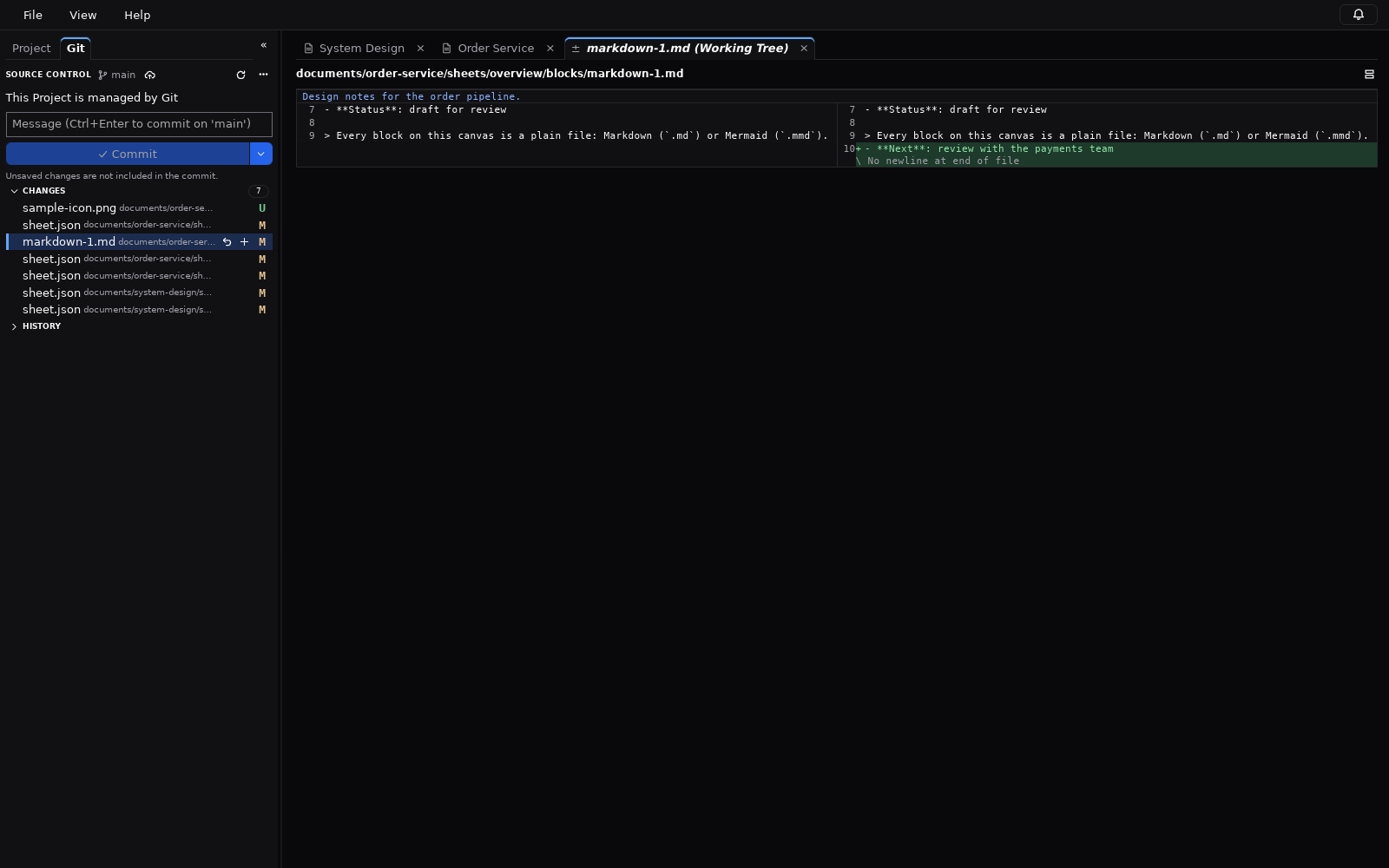
Git inside the app
When the project folder is a Git repository, the Git tab of the sidebar offers:
- the list of changes, with stage and unstage;
- commit, and undo of the last commit;
- history;
- side-by-side diffs that open in tabs;
- discarding changes;
- fetch, pull and push, and publishing a branch to a remote;
- the name of the current branch.
What the app leaves to Git itself
- The app runs the
gitcommand installed on your computer. Git 2.25 or later is required for the Git features; everything else works without Git. - The app does not create a repository. Run
git init(or clone one) with your usual tools; a folder that is not a repository is shown as “not managed by Git”. - Creating and switching branches, merging and resolving conflicts are done with your usual Git tools, not in the app.
When files change outside the app
A pull, a checkout in a terminal, another editor or an AI tool can change the files while a document is open. Design Dawn detects this: a document without unsaved work reloads automatically; otherwise you choose to reload, keep your version, or compare the two.
Reviewing a design in a pull request
Because notes and diagrams are plain text, a design change can go through the same review as a code change: push a branch, open a pull request, and reviewers read the diff of the .md and .mmd files. If you stop using Design Dawn, the documents remain ordinary Markdown and Mermaid files.
AI tools can work on the same files through the local MCP server, and diagrams can be edited in the Mermaid GUI editor.
Try Design Dawn
Free and open source (MIT). The Windows build is a zip file; nothing to sign up for.
Guides: Mermaid GUI · AI / MCP · Download