 Design Dawn
Write design documents with AI through a local MCP server
design-dawn-mcp is a small program that comes with Design Dawn. It speaks the Model Context Protocol (MCP), so an AI tool such as Claude, Codex, GitHub Copilot, Cursor or any other MCP client can read your design documents and, when you allow it, edit them.
Set-up, once per AI tool
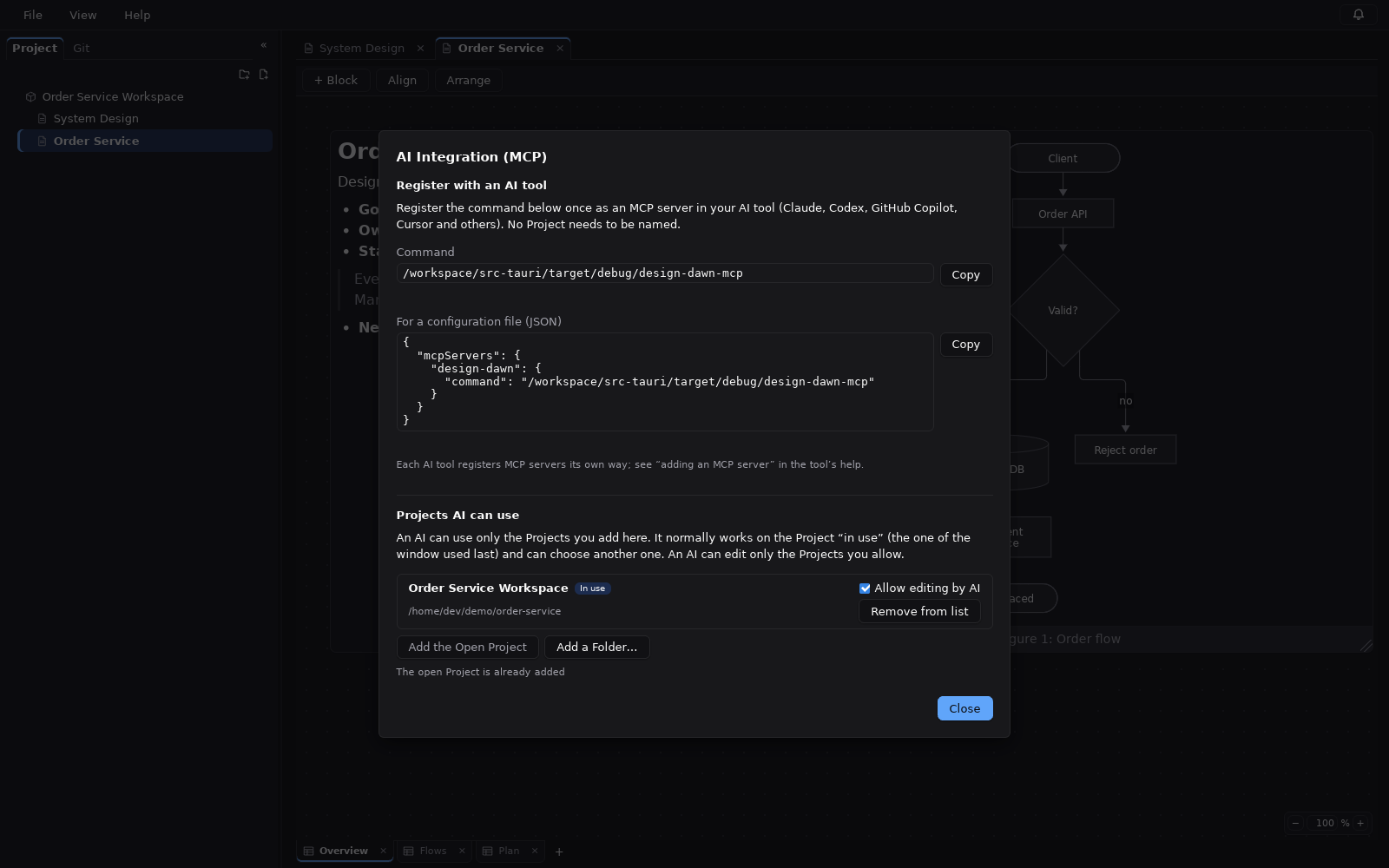
In the app, open File → AI Integration (MCP). It shows the command to register, with a Copy button, and the same thing in the common JSON form:
{
  "mcpServers": {
    "design-dawn": { "command": "C:\\path\\to\\design-dawn-mcp.exe" }
  }
}
Register it the way your AI tool adds MCP servers. For Claude Code, for example:
claude mcp add design-dawn -- <command>The server talks over standard input and output only. It opens no network port, and it works whether or not the app is running.
You choose which projects AI can see
An AI tool can use only the projects you add in the AI Integration screen (Add the Open Project, or Add a Folder…). By default it works on the project open in the app, if that project has been added. It can list the added projects and pick one, so a request like “summarize the order-service project” needs no new registration.
Read-only until you allow editing
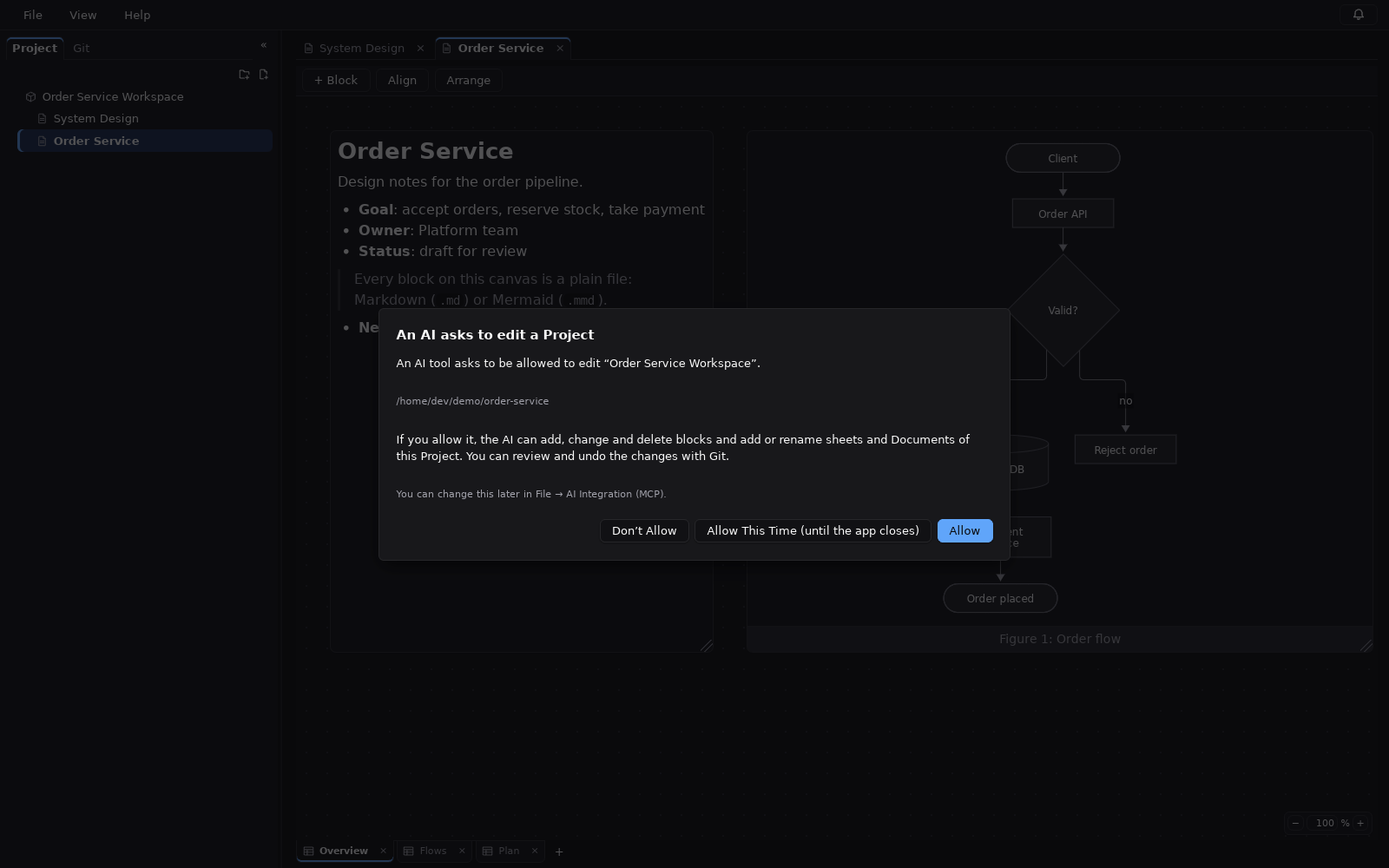
An added project is read-only for AI until you tick Allow editing by AI next to it. An AI tool can also ask for it; the app then asks you to Allow, Allow This Time (until the app closes) or Don’t Allow. After a “no”, further requests for that project are ignored for a while.
The list of projects and permissions is kept in the app’s settings folder, never inside a project, and only the app changes it. An AI tool cannot add a project or give itself access.
What an AI tool can do
| Projects | Tools |
|---|---|
| Any added project | listProjects, selectProject, requestWriteAccess, getProject, getDocument, getSheet, getBlock |
| Projects you allowed editing for | createDocument, createSheet, createBlock, updateDocument, updateSheet, updateBlock, moveBlock, updateBlockCaption, deleteBlock |
createBlockmakes Markdown or Mermaid blocks.updateBlockCaptionsets the caption of a Mermaid or image block.- To change a block’s text, the AI reads it with
getBlockand sends back itscontentHash. If the text changed in the meantime, the call returnsconflictinstead of overwriting your edit. - If the app has the project open, changes made by the AI appear at once.
What it cannot do
The server cannot delete documents, sheets or projects, import files from disk, run commands, use Git, or open network connections.
One fixed project, without the app’s list
For scripts or a single shared project, start the server with --project; add --allow-write to allow changes:
claude mcp add design-dawn -- /path/to/design-dawn-mcp --project /path/to/my-projectThe Windows download includes design-dawn-mcp.exe next to the app. See Download and first steps, or how the files AI edits are tracked with Git.
Try Design Dawn
Free and open source (MIT). The Windows build is a zip file; nothing to sign up for.
Guides: Mermaid GUI · Git · Download